The Challenge
Enterprise instructional design at scale requires more than good ID principles—it requires a repeatable process that works within Agile development cycles.
Our training team was growing fast. Multiple instructional designers were developing courses simultaneously, stakeholders expected iterative reviews, and we needed to deliver training aligned with quarterly product releases.
The problems:
- No standardized process for moving from needs analysis to published content
- Unclear handoffs between IDs, SMEs, and stakeholders
- Content updates were ad-hoc—no systematic way to sunset outdated material
- Agile sprints conflicted with traditional ADDIE waterfall approach
We needed a process that embraced backward design, supported iterative development, and had clear waypoints for Agile definitions of "done."
My Approach
I researched instructional design models that prioritize iteration and prototyping:
Kemp Design Model—A circular model emphasizing continuous evaluation and revision. Unlike ADDIE's linear flow, Kemp acknowledges that instructional design is inherently iterative. Each component—learner analysis, task analysis, objectives, strategies, resources, evaluation—can be revisited as you learn more about the content and audience.
Rapid Prototyping Instructional Design—Borrowed from software development, this approach emphasizes getting working prototypes in front of stakeholders early. Rather than perfecting each phase before moving to the next, you create "good enough" versions, gather feedback, and iterate.
The insight: Agile methodologies and instructional design are compatible—if you design the process correctly.
The Solution
I developed the Content Creation Process (CCP), an 8-stage framework that integrates backward design with Agile development practices.
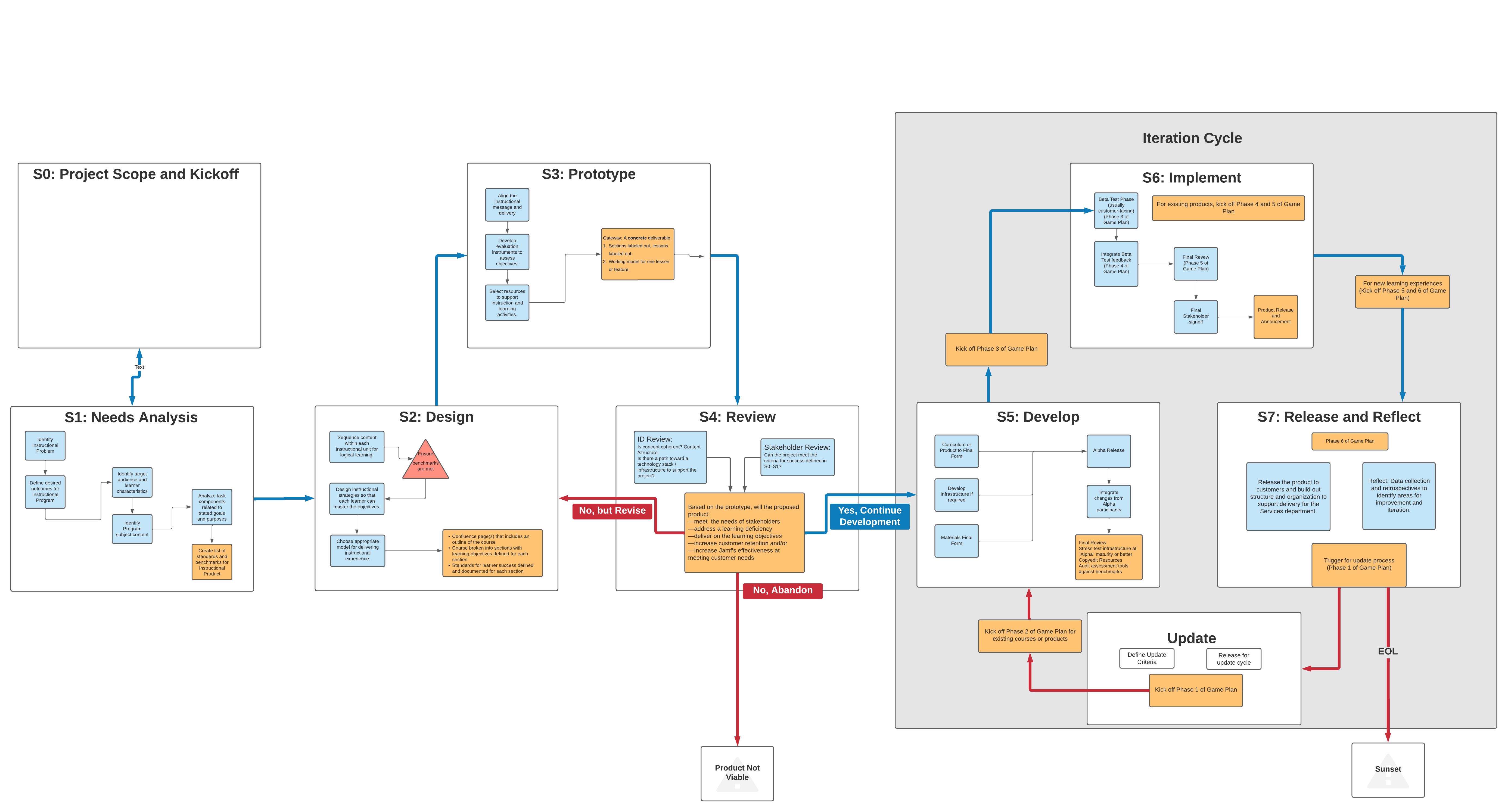
The flowchart above shows the complete process with decision gates, iteration loops, and offramps for content that's no longer viable. Here's how each stage works:
Stage 0: Project Scope and Kickoff
WHO: Stakeholders + Instructional Designers + Project Managers
WHAT:
- Define project scope and boundaries
- Identify key stakeholders and decision-makers
- Establish timeline and resource constraints
- Align on success criteria before diving into needs analysis
WHY THIS MATTERS: Skipping kickoff leads to scope creep and misaligned expectations. This stage ensures everyone agrees on what we're building and why before investing in design work.
AGILE ALIGNMENT: This is sprint 0—establishing the project charter, defining the product backlog, and identifying the product owner.
Stage 1: Needs Analysis
WHO: Stakeholders + Instructional Designers
WHAT:
- Identify the problem - What skill gap or business need are we solving?
- Define learning objectives and gather user stories - What should learners be able to do after training?
- Analyze user needs related to target goals - Who is the audience? What do they already know? What constraints do they face?
DELIVERABLE: Learning objectives documented as user stories with measurable success criteria.
TOOLS: Confluence (documentation), Microsoft Forms (surveys), Domo/Pendo (usage analytics)
AGILE ALIGNMENT: This maps to sprint planning and story definition. Learning objectives become user stories: "As an IT admin, I need to automate app deployment so that I can manage 500 devices efficiently."
Stage 2: Design
WHO: Instructional Designers
WHAT:
- Sequence content - Determine the logical order for presenting information and building skills
- Design instructional strategies based on clear needs - Choose teaching methods that align with learning objectives (e.g., scenarios, demos, practice exercises)
- Choose appropriate delivery and content for objectives - Decide on format (video, interactive, text, hands-on lab) based on what learners need to accomplish
THE DESIGN TRIANGLE: At this stage, you're balancing three constraints: quality, speed, and scope. The flowchart's triangle reminds us that you can't optimize for all three—stakeholders need to prioritize.
DELIVERABLE: Course outline with learning sequence, instructional strategies, and delivery format decisions documented.
TOOLS: Confluence (course outlines), Microsoft Whiteboard (sequencing activities), Draw.io (learning flows)
AGILE ALIGNMENT: This is sprint grooming—breaking the course into modules, lessons, and activities. Each piece gets estimated for development time.
Stage 3: Prototype
WHO: Instructional Designers + Content Creators
WHAT: Choose the prototype fidelity level based on what you need to test:
- Interactive prototype (low-fi) - Clickable mockups to test navigation and flow
- Storyboard - Visual outlines showing screen-by-screen content and interactions
- Static prototype (hi-fi) - Polished single module or lesson to demonstrate look and feel
DELIVERABLE: A presentable prototype that's "half-baked, half-tested, or both"—intentionally incomplete but good enough to validate the approach.
TOOLS: Keynote (rapid prototyping), Confluence (storyboards), Figma/Xcode (UI mockups for digital content)
KEY PRINCIPLE: Create the smallest testable version. Don't perfect it yet—get feedback first. The goal is to fail fast if the approach is wrong, not to build beautiful content that misses the mark.
Stage 4: Review (Critical Decision Gate)
WHO: Instructional Designers + Stakeholders
WHAT: This is the most important checkpoint in the process. Present the prototype and evaluate against three criteria:
- Do the learning objectives still align with business needs? (Priorities may have shifted since kickoff)
- Does the prototype demonstrate a viable approach? (Is this the right instructional strategy?)
- Is there budget and bandwidth to complete development? (Resource constraints are real)
THREE POSSIBLE OUTCOMES:
✅ "Yes, Continue Development" - Prototype validated, proceed to Stage 5 (Develop). This is your green light to invest in full development.
🔄 "No, but Revise" - Good concept, wrong execution. Loop back to Stage 2 (Design) or Stage 3 (Prototype) with specific feedback. Common reasons: scope too large, wrong delivery format, learning objectives need refinement.
🛑 "No, Abandon" - Project no longer viable. Product changed, budget cut, business priorities shifted, or approach fundamentally flawed. Document lessons learned and close the project.
WHY THIS MATTERS: This gate prevents wasting 40-80 hours building the wrong thing. It's better to kill a project at the prototype stage than after full development.
AGILE ALIGNMENT: This is the sprint review demo with a go/no-go decision. Show stakeholders what you built, get feedback, and adjust the backlog—or cancel the epic entirely.
Stage 5: Develop (Build the Full Course)
WHO: Instructional Designers + Content Creators
WHAT:
- Develop instructional materials - Build the full course content based on approved prototype
- Implement formative assessments - Create knowledge checks, practice activities, and scenario-based exercises
- Materials pass review - Internal QA for accuracy, clarity, and instructional quality
PHASE GATES: For large projects, development happens in phases:
- Phase 2 (Kick off Game Plan) - Begin full content development
- Phase 3 - Complete remaining modules after pilot feedback (for iterative projects)
DELIVERABLE: A complete, functional course ready for pilot testing or stakeholder review. It may not be perfectly polished, but every learning objective has corresponding content and assessment.
TOOLS: Heretto CCMS (content management), Articulate Storyline (eLearning), Camtasia (video editing), Skilljar (LMS)
DEFINITION OF DONE: Content is technically accurate, assessments are aligned with objectives, and stakeholders have signed off on the final draft.
Stage 6: Implement (The Iteration Cycle)
WHO: Instructional Designers + Stakeholders + Learners
WHAT: Stage 6 is where theory meets reality. This is an iterative cycle with multiple deployment phases:
FOR NEW LEARNING EXPERIENCES:
- Pilot Test Phase (Phase 3) - Alpha test with small group of learners (5-20 people). Gather detailed feedback on clarity, pacing, and usability.
- Integration Plan (Phase 4) - Go live to larger community after incorporating pilot feedback. Monitor completion rates and satisfaction scores.
- Final Review (Phase 5) - After broader launch, analyze performance data and identify improvements for next iteration.
FOR EXISTING PRODUCTS:
- Kick off Phase 3 or 4 - Deploy updated content with versioning and change logs
- Gather feedback loops to inform next update cycle
FEEDBACK MECHANISMS:
- Learner surveys (post-course satisfaction, knowledge retention checks)
- Usage analytics (completion rates, time on task, drop-off points)
- Instructor feedback (for facilitated courses)
- Help desk ticket analysis (what questions are learners asking?)
TOOLS: Skilljar (LMS), Pendo (usage tracking), Microsoft Forms (learner feedback), Domo (analytics dashboards)
ITERATION CYCLE: This stage loops back to Stage 7 (Release and Reflect), which then feeds into the Update pathway or continues to the next iteration.
Stage 7: Release and Reflect
WHO: Instructional Designers + Stakeholders + Service Delivery Teams
WHAT: After full deployment, step back and evaluate:
- Retrospectives - Team reflection: What went well? What would we do differently?
- Data collection and analysis - Review learner performance data, completion rates, satisfaction scores
- Release product to stakeholders - Official handoff to delivery teams with documentation
- Final review by Service Delivery - Frontline teams provide feedback on supportability and learner questions
TWO PATHS FORWARD:
🔄 UPDATE PATHWAY - Content needs revision due to:
- Product changes (new features, deprecated workflows)
- Performance data showing gaps (learners struggling with specific topics)
- Stakeholder requests for expanded scope
When updates are needed:
- Define update criteria - What needs to change and why?
- Request for update cycle - Formally scope the update work
- Loop back to Stage 5 (Develop) - Make targeted improvements without re-prototyping
🏁 END OF LIFE (EOL) PATHWAY - Content reaches natural endpoint:
- Product sunsetted or significantly redesigned
- Learning objectives no longer relevant to business
- Usage drops below threshold for maintenance investment
- SUNSET - Formally retire content, archive for reference, communicate to stakeholders
AGILE ALIGNMENT: This is retrospective and continuous deployment. The course is never "done"—it evolves based on learner needs and product changes, or it gets retired when it no longer serves the business.
Key Decision Points and Loops
The CCP isn't a linear waterfall—it's built for iteration and adaptation. Here are the critical decision points:
🚦 Stage 4 Review (The Quality Gate)
- Go → Proceed to Stage 5 (Develop)
- Revise → Loop back to Stage 2 (Design) or Stage 3 (Prototype)
- Abandon → Project no longer viable, document lessons learned
🔄 The Iteration Cycle (Stages 6-7)
- Stage 6 (Implement) → Stage 7 (Release and Reflect) → Update pathway or EOL decision
- For updates: Loop back to Stage 5 (Develop) with targeted changes
- For new experiences: Progress through pilot → integration → final review
🛑 Offramps (When to Sunset Content)
- Stage 4: Prototype doesn't validate approach or priorities changed
- Stage 7: Product reached end of life or usage too low to justify maintenance
⚡ Phase Gates (For Large Projects)
- Phase 2: Full content development after prototype approval
- Phase 3: Pilot testing with small learner group
- Phase 4: Broader launch after pilot feedback
- Phase 5: Final review and handoff to service delivery
These gates and loops ensure that resources are invested wisely and content evolves with learner needs.
Process Tools Summary
| Process Stage | Tools |
|---|---|
| S0: Project Scope and Kickoff | Confluence (project charter), Stakeholder meetings |
| S1: Needs Analysis | Confluence, Microsoft Forms, Domo, Pendo |
| S2: Design | Confluence, Microsoft Whiteboard, Draw.io |
| S3: Prototype | Keynote, Confluence, Figma, Xcode |
| S4: Review (Decision Gate) | Confluence (documentation), Stakeholder meetings |
| S5: Develop | Heretto CCMS, Articulate Storyline, Camtasia, Skilljar |
| S6: Implement (Iteration Cycle) | Skilljar, Pendo, Microsoft Forms, Domo |
| S7: Release and Reflect | Confluence, Domo, Pendo, Retrospective meetings |
Impact
Standardized Workflow
- New instructional designers onboarded in 2-3 weeks instead of 2-3 months
- Clear waypoints for "definition of done" at each stage
- Reduced miscommunication between IDs, SMEs, and stakeholders
Faster Iteration Cycles
- Review cycles reduced from 4-6 weeks to 2-3 weeks
- Prototyping reduced wasted effort on content that didn't meet needs
- Agile sprints aligned with course development milestones
Content Quality Improvements
- Systematic feedback loops ensured content stayed current
- Offramps prevented "zombie content" from lingering in the catalog
- Analytics-driven updates focused effort on highest-impact improvements
Cross-Team Adoption
- Process documentation shared across training, customer success, and product teams
- Became the foundation for training team SOPs
- Influenced how other teams approached content development
What I Learned
Process documentation is a learning product. The CCP wasn't just a flowchart—it required training materials, task checklists, and onboarding guides. I learned to treat process design the same way I treat course design: clear objectives, scaffolding, and iterative improvement.
Agile and instructional design aren't opposites. Traditional ADDIE assumes you can fully define requirements upfront, but enterprise training rarely works that way. Products change, learners surprise you, and stakeholders evolve their thinking. The CCP embraces this uncertainty by building in review loops and offramps.
Prototyping saves time. The single biggest efficiency gain came from Stage 3 (Prototype). Spending 4-6 hours on a rough draft and getting feedback prevented 20-40 hours of wasted development on the wrong approach. Stakeholders don't know what they want until they see something.
The biggest challenge wasn't the process—it was adoption. Some instructional designers resisted "extra steps" like prototyping. The breakthrough came when I reframed it: "You're already iterating—this just makes it intentional and documented." Once the team saw faster reviews and fewer revisions, adoption accelerated.
References
- Rapid Prototyping Instructional Design: Revisiting the ISD Model - ERIC Document ED504673
- Kemp Design Model - EduTech Wiki